Gateway Mode: Bridge a Whole LAN to Your Mesh
With meshr Gateway Mode, install the agent on one device and reach an entire LAN or subnet over your mesh — IoT, cameras, printers, NAS and legacy servers included — without putting an agent on every box.
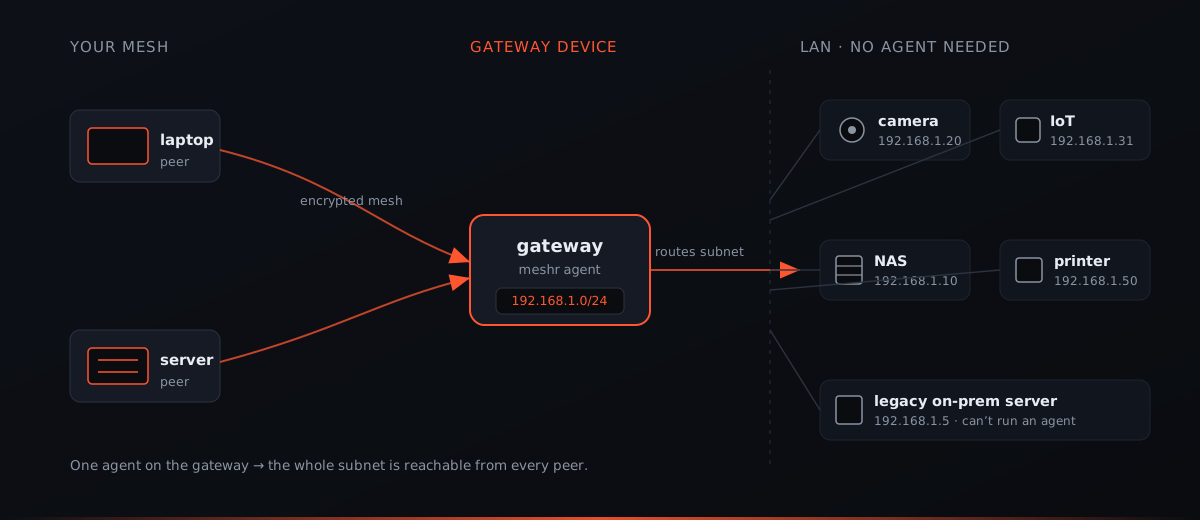
Some machines will never run a VPN agent. The IP camera in the warehouse, the label printer by the loading dock, the NAS humming in a closet, the decade-old application server nobody dares touch — none of them will accept a package install, and you wouldn’t want to babysit an agent on each one anyway. Yet these are exactly the devices your team needs to reach from the road.
meshr Gateway Mode is the answer: put the agent on one device on that network, advertise the subnet behind it, and every peer in your mesh can suddenly reach the whole segment — securely, by IP — with nothing installed on the devices themselves.
The problem: you can’t put an agent everywhere
The clean mesh model is one agent per device: install, enroll, done. It’s brilliant for laptops and servers you control. But real networks are full of things that fall outside that model:
- Appliances and IoT — cameras, sensors, badge readers, industrial controllers. Locked-down firmware, no shell, no package manager.
- Peripherals — network printers, scanners, a NAS with a vendor OS you can’t extend.
- Legacy servers — that one production box running an OS from another era, where “just install this” is a change-freeze conversation.
- Whole office or branch LANs — dozens or hundreds of hosts where per-device rollout would be a project of its own.
For all of these, the per-device approach simply doesn’t apply. You need a way to reach the network, not just the endpoints you can manage.
The solution: one gateway advertises the subnet
Gateway Mode inverts the model. Instead of every device joining the mesh, a single device — the gateway — joins on their behalf and routes traffic to the subnet sitting behind it.
You pick any Linux box already on that network (a small always-on server, a spare mini-PC, a Raspberry Pi). It runs the meshr agent like any other peer, so it has its own encrypted mesh connection. Then you tell meshr: this device speaks for 192.168.1.0/24. From that moment, when a peer anywhere in your mesh addresses something in that range, the traffic is carried encrypted across the mesh to the gateway, which forwards it onto the local LAN and relays the replies back.
The devices on the LAN don’t know or care that any of this is happening. To them it’s ordinary local traffic arriving from the gateway. There’s nothing to install, configure, or update on the camera, the printer, or the legacy server — the gateway does all the work, once.
How to set it up
Setting up a gateway is the same three steps as any peer, plus one route assignment in the portal.
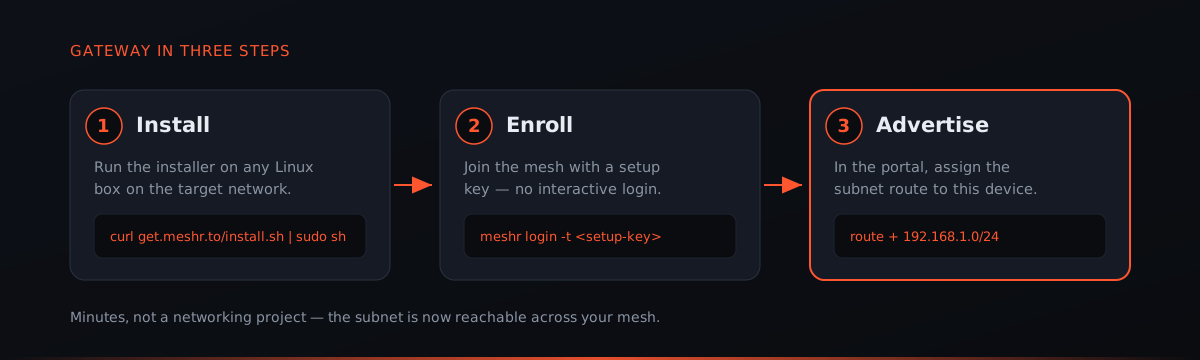
1. Install the agent on the device you’ve chosen as the gateway:
curl -fsSL https://get.meshr.to/install.sh | sudo bash2. Enroll it into your mesh with a setup key, so it joins headless — no interactive browser login on a closet server:
meshr login -t <your-setup-key>
meshr up
3. Advertise the subnet. In the portal, open the gateway device and assign it a route for the network behind it — for example 192.168.1.0/24. Approve it, and meshr distributes the route to your other peers.
That’s the whole thing. No routing tables to hand-edit, no NAT rules to craft, no BGP. In a few minutes an entire subnet goes from “unreachable off-site” to “reachable from every device in the mesh.”
Where teams use it
Gateway Mode shows up anywhere you need to reach many things through one door:
- Remote access to an office LAN — work from anywhere and reach the file server, the internal wiki, the shared printer, exactly as if you were at your desk.
- IoT and camera segments — pull footage or telemetry from a locked-down device network without exposing any of it to the public internet.
- On-prem and legacy servers — bring that un-agentable application box into reach for the people who maintain it, without touching the box.
- Branch and site-to-site links — drop a gateway at each site and stitch remote offices, a lab, or a colo into one flat, private network — a lightweight site-to-site mesh without dedicated hardware VPN gateways.
In each case the payoff is the same: broad reach from a single, controlled install, instead of a rollout across devices you may not even be able to log into.
Built to stay reachable
A gateway is load-bearing — if it’s your only path to a subnet, it needs to stay responsive even when the box it lives on is busy. meshr is designed for that. The gateway’s networking runs with scheduling priority and self-healing built in, so even when the daemon is co-located with a heavy local workload, mesh connectivity and forwarding keep answering rather than stalling behind whatever else the machine is doing.
For segments where downtime isn’t an option, you can go a step further: dedicate a device to the gateway role so nothing competes with it, and pair gateways for high availability so a single reboot or failure doesn’t cut the network off. Start with a spare box for convenience; graduate to a dedicated or paired gateway when a subnet becomes critical — the setup is the same either way.
The bottom line
Not everything can run an agent, and it shouldn’t have to. Gateway Mode lets one enrolled device carry a whole LAN into your mesh — cameras, printers, NAS boxes, legacy servers, entire office networks — reachable securely from anywhere, with nothing installed on the devices themselves. One install, one route, and the network behind it comes online for your whole team.
Ready to bring a whole subnet into your mesh? Build a mesh for free, install the agent on one gateway box with get.meshr.to, and advertise the route in app.meshr.to.